Scalable performance analysis with Projections Sanjay Kale, - - PowerPoint PPT Presentation

scalable performance analysis with projections
SMART_READER_LITE
LIVE PREVIEW

Scalable performance analysis with Projections Sanjay Kale, - - PowerPoint PPT Presentation

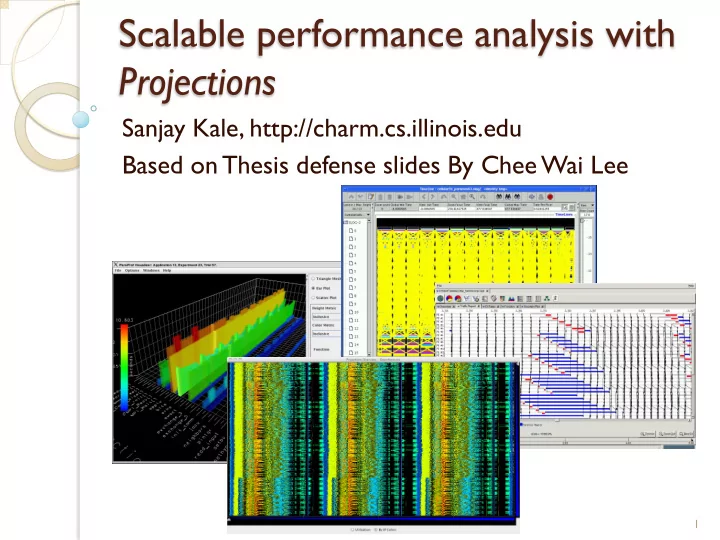
Scalable performance analysis with Projections Sanjay Kale, http://charm.cs.illinois.edu Based on Thesis defense slides By Chee Wai Lee 1 Effects of Application Scaling Enlarged performance-space. Increased performance data volume.

slide-1
SLIDE 1

Scalable performance analysis with Projections

Sanjay Kale, http://charm.cs.illinois.edu Based on Thesis defense slides By Chee Wai Lee

1

slide-2
SLIDE 2

Effects of Application Scaling

— Enlarged performance-space. — Increased performance data volume. — Reduces accessibility to machines and

increases resource costs

  • Time to queue.
  • CPU resource consumption.

2

slide-3
SLIDE 3

Overview

— Introduction. — Scalable Techniques:

  • Support for Analysis Idioms
  • Data Reduction
  • Live Streaming
  • Hypothesis Testing

3

slide-4
SLIDE 4

Scalable Tool Features: Motivations

— Performance analysis idioms need to be

effectively supported by tool features.

— Idioms must avoid using tool features that

become ineffectual at large processor counts.

— We want to catalog common idioms and

match these with scalable features.

4

slide-5
SLIDE 5

Scalable Tool Feature Support (1/2)

— Non-scalable tool features require

analysts to scan for visual cues over the processor domain.

— How do we avoid this requirement on

analysts?

5

slide-6
SLIDE 6

Scalable Tool Feature Support (2/2)

— Aggregation across processor domain:

  • Histograms.
  • High resolution Time Profiles.

— Processor selection:

  • Extrema T
  • ol.

6

slide-7
SLIDE 7

Histogram as a Scalable Tool Feature

— Bins represent time spent by activities. — Counts of activities across all processors

are added to appropriate bins.

— Total counts for each activity are

displayed as different colored bars.

7

slide-8
SLIDE 8

Case Study:

— Apparent load imbalance. — No strategy appeared to solve imbalance. — Picked overloaded processor timelines.* — Found longer-than-expected activities. — Longer activities associated with specific

  • bjects.

— Possible work grainsize distribution

problems.

8

*As we will see later, not effective with large numbers of processors.

slide-9
SLIDE 9

Case Study: Validation using Histograms

9

slide-10
SLIDE 10

Effectiveness of Idiom

— Need to find way to pick out overloaded

  • processors. Not scalable!

— Finding out if work grainsize was a

problem simply required the histogram feature.

10

slide-11
SLIDE 11

High Resolution Time Profiles

— Shows activity-overlap over time summed

across all processors.

— Heuristics guide the search for visual cues

for various potential problems:

  • Gradual downward slopes hint at possible

load imbalance.

  • Gradual upward slopes hint at communication

inefficiencies.

— At high resolution, gives insight into

application sub-structure.

11

slide-12
SLIDE 12

Case Study: Using Time Profiles

Possible Load Imbalance After Greedy Load Balancing Strategy

12

Bigger!

slide-13
SLIDE 13

Finding Extreme or Unusual Processors

— A recurring theme in analysis idioms. — Easy to pick out timelines in datasets with

small numbers of processors.

— Examples of attributes and criteria:

  • Least idle processors.
  • Processors with late events.
  • Processors that behave very differently from

the rest.

13

slide-14
SLIDE 14

The Extrema T

  • ol

— Semi-automatically picks out interesting

processors to display.

— Decisions based on analyst-specified

criteria.

— Mouse-clicks on bars load interesting

processors onto timeline.

14

slide-15
SLIDE 15

Using the Extrema T

  • ol

15

slide-16
SLIDE 16

Some recent examples: scalable views

16

slide-17
SLIDE 17

17

slide-18
SLIDE 18

Scalable Tool Features: Conclusions

— Effective analysis idioms must avoid non-

scalable features.

— Histograms, Time Profiles and the

Extrema Tool offer scalable features in support of idioms.

18

slide-19
SLIDE 19

Data Reduction

— Normally, scalable tool features are used

with full event traces.

— What happens if full event traces get too

large?

— We can:

  • Choose to keep event traces for only a subset
  • f processors.
  • Replace event traces of discarded processors

with interval-based profiles.

19

slide-20
SLIDE 20

Choosing Useful Processor Subset (1/2)

— What are the challenges?

  • No a priori information about performance

problems in dataset.

  • Chosen processors need to capture details of

performance problems.

20

slide-21
SLIDE 21

Choosing Useful Processor Subsets (2/2)

— Observations:

  • Processors tend to form equivalence classes

with respect to performance behavior.

  • Clustering can be used to discover

equivalence classes in performance data.

  • Outliers in clusters may be good candidates

for capturing performance problems.

21

slide-22
SLIDE 22

Applying k-Means Clustering to Performance Data

— Treat the vector of recorded performance metric

values on each processor as a data point for clustering.

— Measure similarity between two data points using

the Euclidean Distance between the two metric vectors.

— Given k clusters to be found, the goal is to

minimize similarity values between all data points and the centroids of the k clusters.

22

slide-23
SLIDE 23

Choosing from Clusters

— Choosing Cluster Outliers.

  • Pick processors furthest from cluster

centroid.

  • Number chosen by proportion of cluster size.

— Choosing Cluster Exemplars.

  • Pick a single processor closest to the cluster

centroid.

— Outliers + Exemplars = Reduced Dataset.

23

slide-24
SLIDE 24

Applying k-Means Clustering Online

— “Death-bed” or “Moriens” analysis:

  • Just before the program terminates, we have

all performance logs, and a huge parallel m/c

  • This is the simplest example of Moriens

analysis

— Decisions on data retention are made

before data is written to disk.

— Requires a low-overhead and scalable

parallel k-Means algorithm

24

slide-25
SLIDE 25

Important k-Means Parameters

— Choice of metrics from domains:

  • Activity time.
  • Communication volume (bytes).
  • Communication (number of messages).

— Normalization of metrics:

  • Same metric domain = no normalization.
  • Min-max normalization across different metric

domains to remove inter-domain bias.

25

slide-26
SLIDE 26

Equivalence Class Discovery

Metric Y Metric X Euclidean Distance Outliers Representatives

slide-27
SLIDE 27

Overhead of parallel k-Means

0.075 0.150 0.225 0.300 240 1200 2400 4800 9600 19200

Number of Processor Cores Seconds Time to Perform K-Means Clustering

27

slide-28
SLIDE 28

Data Reduction: Conclusions

— Showed combination of techniques for

  • nline data reduction is effective*.

— Choice of processors included in reduced

datasets can be refined and improved

  • Include communicating processors.
  • Include processors on critical path.

— Consideration of application phases can

further improve quality of reduced dataset.

28

*Chee Wai Lee, Celso Mendes and Laxmikant

  • V. Kale. T
  • wards Scalable

Performance Analysis and Visualization through Data Reduction. 13th International Workshop on High-Level Parallel Programming Models and Supportive Environments, Miami, Florida, USA, April 2008.

slide-29
SLIDE 29

Live Streaming of Performance Data

— Live Streaming mitigates need to store a

large volume of performance data.

— Live Streaming enables analysis idioms

that provide animated insight into the trends application behavior.

— Live Streaming also enables idioms for the

  • bservation of unanticipated problems,

possibly over a long run.

29

slide-30
SLIDE 30

Challenges to Live Streaming

— Must maintain low overhead for

performance data to be recorded, pre- processed and disposed-of.

— Need efficient mechanism for

performance data to be sent via out-of- band channels to one (or a few) processors for delivery to a remote client.

30

slide-31
SLIDE 31

Enabling Mechanisms

— Charm++ adaptive runtime as medium for

scalable and efficient:

  • Control signal delivery.
  • Performance data capture and delivery.

— Converse Client-Server (CCS) enables

remote interaction with running Charm+ + application through a socket opened by the runtime.

31

slide-32
SLIDE 32

Live Streaming System Overview

32

slide-33
SLIDE 33

What is Streamed?

— A Utilization Profile similar to high

resolution Time Profiles.

— Performance data is compressed by only

considering significant metrics in a special format.

— Special reduction client merges data from

multiple processors.

33

slide-34
SLIDE 34

Visualization

34

slide-35
SLIDE 35

Overheads (1/2)

512 1024 2048 4096 8192 With instrumentation, data reductions to root with remote client attached. 0.94% 0.17%

  • 0.26%

0.16% 0.83% With instrumentation, data reductions to root but no remote client attached. 0.58%

  • 0.17%

0.37% 1.14% 0.99%

35

% Overhead when compared to baseline system: Same application with no performance instrumentation.

slide-36
SLIDE 36

Overheads (2/2)

For bandwidth consumed when streaming performance data to the remote visualization client.

36

slide-37
SLIDE 37

Live Streaming: Conclusions*

— Adaptive runtime allowed out-of-band

collection of performance data while in user-space.

— Achieved with very low overhead and

bandwidth requirements.

37

*Isaac Dooley, Chee Wai Lee, and Laxmikant

  • V. Kale. Continuous

Performance Monitoring for Large-Scale Parallel Applications. Accepted for publication at HiPC 2009, December-2009.

slide-38
SLIDE 38

Repeated Large-Scale Hypothesis Testing

— Large-Scale runs are expensive:

  • Job submission of very wide jobs to

supercomputing facilities.

  • CPU resources consumed by very wide jobs.

— How do we make repeated but

inexpensive hypothesis testing experiments?

38

slide-39
SLIDE 39

Trace-based Simulation

— Capture event dependency logs from a

baseline application run.

— Simulation produces performance event

traces from event dependency logs.

39

slide-40
SLIDE 40

Advantages

— The time and memory requirements at

simulation time are divorced from requirements at execution time.

— Simulation can be executed on fewer

processors.

— Simulation can be executed on a cluster

  • f workstations and still produce the

same predictions.

40

slide-41
SLIDE 41

Using the BigSim Framework (1/2)

— BigSim emulator captures:

  • Relative event time stamps.
  • Message dependencies.
  • Event dependencies.

— BigSim emulator produces event

dependency logs.

41

slide-42
SLIDE 42

Using the BigSim Framework (2/2)

— BigSim simulator uses a PDES engine to

process event dependency logs to predict performance.

— BigSim simulator can generate

performance event traces based on the predicted run.

42

slide-43
SLIDE 43

Examples of Hypothesis Testing Possible

— Hypothetical Hardware changes:

  • Communication Latency.
  • Network properties.

— Hypothetical Software changes:

  • Different load balancing strategies.
  • Different initial object placement.
  • Different number of processors with the

same object decomposition.

43

slide-44
SLIDE 44

Example: Discovering Latency Trends

— Study the effects of network latency on

performance of seven-point stencil computation

— For each of the data-points on the plots

  • n next few slide/s
  • You have full traces
  • Can do projections analysis as if you ran it on

the modified machine (with lower/higher latency)

44

slide-45
SLIDE 45

Latency Trends – Jacobi 3d 256x256x192 on 48 pes

45

slide-46
SLIDE 46

Summary

— Scalable views can be effective tools

  • Histograms, time-profiles, …

— Data reduction via on-line analysis

  • Parallel k-means, Sampling

— Live analysis: helped by message-driven

execution

— Traces can be used for simulation:

  • what-if analysis via BigSim

46

slide-47
SLIDE 47

Further Thoughts

— Future: a lot more emphasis on moriens (death-bed)

analysis

  • Requires more automation of the analysis process

— More “Automated Expert Analysis”

  • Topic of 1994 thesis on projections

— Message-driven execution or communication layer

integration for tools communication

  • No “out of band” issues

— Another grand challenge/s:

  • How to get grad students interested in tools research?
  • How to get funding in this area?

– All our work has been (mostly) unfunded or only indirectly funded

47