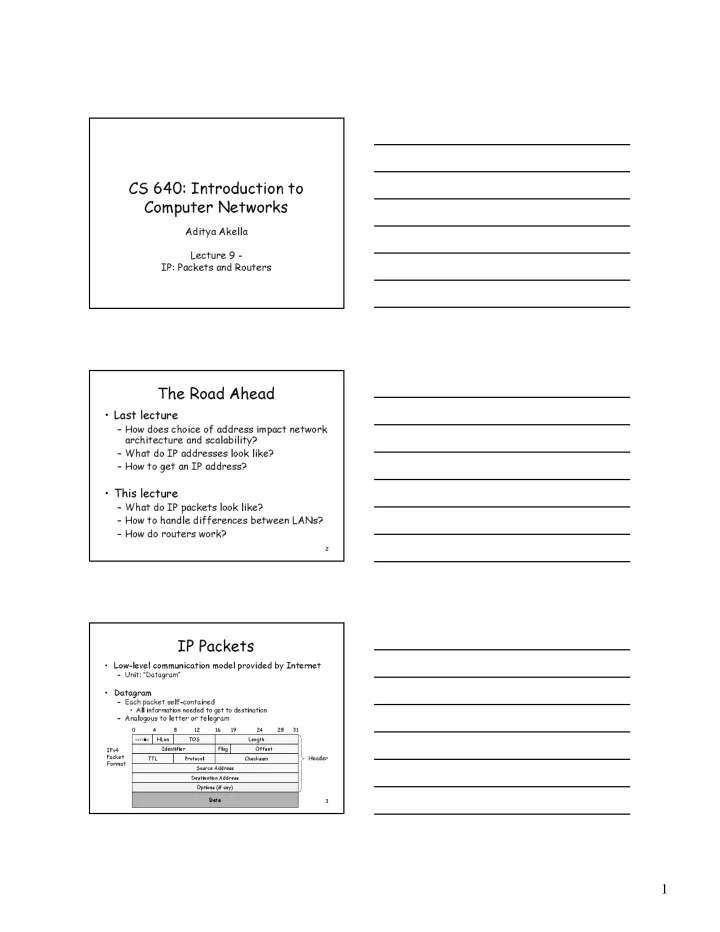
CS 640: Introduction to Computer Networks Aditya Akella Lecture 9 - - PDF document

cs 640 introduction to computer networks
SMART_READER_LITE
LIVE PREVIEW

CS 640: Introduction to Computer Networks Aditya Akella Lecture 9 - - PDF document

CS 640: Introduction to Computer Networks Aditya Akella Lecture 9 - IP: Packets and Routers The Road Ahead Last lecture How does choice of address impact network architecture and scalability? What do IP addresses look like?


slide-1
SLIDE 1

1

CS 640: Introduction to Computer Networks

Aditya Akella Lecture 9 - IP: Packets and Routers

2

The Road Ahead

  • Last lecture

– How does choice of address impact network architecture and scalability? – What do IP addresses look like? – How to get an IP address?

  • This lecture

– What do IP packets look like? – How to handle differences between LANs? – How do routers work?

3

IP Packets

  • Low-level communication model provided by Internet

– Unit: “Datagram”

  • Datagram

– Each packet self-contained

  • All information needed to get to destination

– Analogous to letter or telegram

4 8 12 16 19 24 28 31

version

HLen TOS Length Identifier Flag Offset TTL Protocol Checksum Source Address Destination Address Options (if any) Data Header IPv4 Packet Format

slide-2
SLIDE 2

2

4

IPv4 Header Fields

  • Version: IP Version

– 4 for IPv4 – 6 for IPv6

  • HLen: Header Length

– 32-bit words (typically 5)

  • TOS: Type of Service

– Priority information

  • Length: Packet Length

– Bytes (including header)

  • Header format can change with versions

– First byte identifies version – IPv6 header are very different – will see later

  • Length field limits packets to 65,535 bytes

– In practice, break into much smaller packets for network performance considerations

4 8 12 16 19 24 28 31 version HLen TOS Length Identifier Flags Offset TTL Protocol Checksum Source Address Destination Address Options (if any) Data

5

IPv4 Header Fields

  • Identifier, flags, fragment
  • ffset used primarily for

fragmentation

  • Time to live

– Must be decremented at each router – Packets with TTL=0 are thrown away – Ensure packets exit the network

  • Protocol

– Demultiplexing to higher layer protocols – TCP = 6, ICMP = 1, UDP = 17…

  • Header checksum

– Ensures some degree of header integrity – Relatively weak – only 16 bits

  • Options

– E.g. Source routing, record route, etc. – Performance issues at routers

  • Poorly supported or not at all

4 8 12 16 19 24 28 31 version HLen TOS Length Identifier Flags Offset TTL Protocol Checksum Source Address Destination Address Options (if any) Data

6

IPv4 Header Fields

  • Source Address

– 32-bit IP address of sender

  • Destination Address

– 32-bit IP address of destination

  • Like the addresses on an envelope
  • Globally unique identification of sender & receiver

– NAT?

4 8 12 16 19 24 28 31 version HLen TOS Length Identifier Flags Offset TTL Protocol Checksum Source Address Destination Address Options (if any) Data

slide-3
SLIDE 3

3

7

IP Delivery Model

  • Best effort service

– Network will do its best to get packet to destination

  • Does NOT guarantee:

– Any maximum latency or even ultimate success – Sender will be informed if packet doesn’t make it – Packets will arrive in same order sent – Just one copy of packet will arrive

  • Implications

– Scales very well simple, dumb network; “plug-n-play” – Higher level protocols must make up for shortcomings

  • Reliably delivering ordered sequence of bytes TCP

– Some services not feasible

  • Latency or bandwidth guarantees
  • Need special support

8

IP Fragmentation

  • Every Network has Own Maximum Transmission Unit

(MTU)

– Largest IP datagram it can carry within its own packet frame

  • E.g., Ethernet is 1500 bytes

– Don’t know MTUs of all intermediate networks in advance

  • IP Solution

– When hit network with small MTU, fragment packets

  • Might get further fragmentation as proceed farther

host host router router MTU = 4000 MTU = 1500 MTU = 2000 9

Reassembly

  • Where to do reassembly?

– End nodes or at routers?

  • End nodes -- better

– Avoids unnecessary work where large packets are fragmented multiple times – If any fragment missing, delete entire packet

  • Intermediate nodes -- Dangerous

– How much buffer space required at routers? – What if routes in network change?

  • Multiple paths through network
  • All fragments only required to go through destination
slide-4
SLIDE 4

4

10

Fragmentation Related Fields

  • Length

– Length of IP fragment

  • Identification

– To match up with other fragments

  • Fragment offset

– Where this fragment lies in entire IP datagram

  • Flags

– “More fragments” flag – “Don’t fragment” flag

11

IP Fragmentation Example #1

host router MTU = 4000 IP Header IP Data Length = 3820, M=0 12

IP Fragmentation Example #2

router router MTU = 2000 IP Header IP Data Length = 3820, M=0 3800 bytes IP Header IP Data Length = 2000, M=1, Offset = 0 1980 bytes IP Data IP Header Length = 1840, M=0, Offset = 1980 1820 bytes

slide-5
SLIDE 5

5

13

IP Fragmentation Example #3

IP Header IP Data

Length = 2000, M=1, Offset = 0

1980 bytes IP Data IP Header

Length = 1840, M=0, Offset = 1980

1820 bytes host router MTU = 1500 IP Header IP Data

Length = 1500, M=1, Offset = 0

1480 bytes IP Header IP Data

Length = 520, M=1, Offset = 1480

500 bytes IP Header IP Data

Length = 1500, M=1, Offset = 1980

1480 bytes IP Header IP Data Length = 360, M=0, Offset = 3460 340 bytes 14

IP Reassembly

  • Fragments might arrive out-of-order

– Don’t know how much memory required until receive final fragment

  • Some fragments may never arrive

– After a while, give up entire process

IP Header IP Data

Length = 1500, M=1, Offset = 0

IP Header IP Data

Length = 520, M=1, Offset = 1480

IP Header IP Data

Length = 1500, M=1, Offset = 1980

IP Header IP Data

Length = 360, M=0, Offset = 3460

IP Data IP Data IP Data IP Data 15

Fragmentation and Reassembly

  • Demonstrates many Internet concepts

– Decentralized

  • Every network can choose MTU

– Connectionless

  • Each fragment contains full routing information
  • Fragments can proceed independently and along different routes

– Complex endpoints and simple routers (david clark paper)

  • Reassembly at endpoints
  • Uses resources poorly

– Forwarding, replication, encapsulations costs – Worst case: packet just bigger than MTU – Poor end-to-end performance

  • Loss of a fragment
  • How to avoid fragmentation?

– Path MTU discovery protocol determines minimum MTU along route – Uses ICMP error messages

slide-6
SLIDE 6

6

16

Internet Control Message Protocol (ICMP)

  • Short messages used to send error & other control

information

  • Examples

– Echo request / response

  • Can use to check whether remote host reachable

– Destination unreachable

  • Indicates how far packet got & why couldn’t go further

– Flow control (source quench)

  • Slow down packet delivery rate

– Timeout

  • Packet exceeded maximum hop limit

– Router solicitation / advertisement

  • Helps newly connected host discover local router

– Redirect

  • Suggest alternate routing path for future messages

17

IP MTU Discovery with ICMP

  • Operation

– Send max-sized packet with “do not fragment” flag set – If encounters problem, ICMP message will be returned

  • “Destination unreachable: Fragmentation needed”
  • Usually indicates MTU encountered
  • Typically send series of packets from one host to another

– Amortize discovery cost

  • Typically, all will follow same route

– Routes remain stable for minutes at a time – Makes sense to to MTU discovery host host router router MTU = 4000 MTU = 1500 MTU = 2000 18 MTU = 4000

IP MTU Discovery with ICMP

host host router MTU = 1500 MTU = 2000 IP Packet Length = 4000, Don’t Fragment router ICMP

  • Frag. Needed

MTU = 2000

slide-7
SLIDE 7

7

19 MTU = 4000

IP MTU Discovery with ICMP

host host MTU = 1500 MTU = 2000 IP Packet Length = 2000, Don’t Fragment router ICMP

  • Frag. Needed

MTU = 1500 router 20 MTU = 4000

IP MTU Discovery with ICMP

  • When successful, no reply at IP level

– “No news is good news”

  • Higher level protocol might have some form of

acknowledgement

host host MTU = 1500 MTU = 2000 IP Packet Length = 1500, Don’t Fragment router router 21

Router Architecture Overview

Two key router functions:

  • Run routing algorithms/protocol (RIP, OSPF, BGP)
  • Switching datagrams from incoming to outgoing link
  • 1. input port
  • 2. output port

L i n e C a r d L i n e C a r d L i n e C a r d

3. 4.

slide-8
SLIDE 8

8

22

Line Card: Input Port

Decentralized switching:

  • Process common case (“fast-path”) packets

– Decrement TTL, update checksum, forward packet

  • Given datagram dest., lookup output port

using routing table in input port memory

  • Queue needed if datagrams arrive faster

than forwarding rate into switch fabric Physical layer: bit-level reception Data link layer: e.g., Ethernet

23

Line Card: Output Port

  • Queuing required when datagrams arrive from

fabric faster than the line transmission rate

24

Three Types of Switching Fabrics

slide-9
SLIDE 9

9

25

Switching Via a Memory

First generation routers looked like PCs

  • Packet copied by system’s (single) CPU
  • Speed limited by memory bandwidth (2 bus crossings

per datagram)

Input Port Output Port Memory System Bus

Most modern routers switch via memory, but…

  • Input port processor performs lookup, copy into

memory

  • Cisco Catalyst 8500

26

Switching Via a Bus

  • Datagram from input port

memory to output port memory via a shared bus

  • Bus contention: switching

speed limited by bus bandwidth

  • 1 Gbps bus, Cisco 1900:

sufficient speed for access and enterprise routers (not regional or backbone)

27

Switching Via an Interconnection Network

  • Overcome bus and memory

bandwidth limitations

  • Crossbar provides full NxN

interconnect

– Expensive – Uses 2N buses

  • Banyan networks & other

interconnection nets initially developed to connect processors in multiprocessor

– Typically less capable than complete crossbar

  • Cisco 12000: switches Gbps

through the interconnection network

slide-10
SLIDE 10

10

28

Network Processor

  • Runs routing protocol and downloads

forwarding table to forwarding engines

  • Performs “slow” path processing

– ICMP error messages – IP option processing – Fragmentation – Packets destined to router

29

A Note on Buffering

  • 3 types of switch buffering

– Input buffering

  • Fabric slower than input ports combined queuing may occur at

input queues

– Can avoid any input queuing by making switch speed = N x link speed

– Output buffering

  • Buffering when arrival rate via switch exceeds output line speed

– Internal buffering

  • Can have buffering inside switch fabric to deal with limitations
  • f fabric
  • What happens when these buffers fill up?

– Packets are THROWN AWAY!! This is where (most) packet loss comes from

30

Input Port Queuing

  • Which inputs are processed each slot –

schedule?

  • Head-of-the-Line (HOL) blocking: datagram

at front of queue prevents others in queue from moving forward

slide-11
SLIDE 11

11

31

Output Port Queuing

  • Scheduling discipline chooses among queued

datagrams for transmission

– Can be simple (e.g., first-come first-serve) or more clever (e.g., weighted round robin)

32

Forwarding: Longest Prefix Match

  • Traditional method –

Patricia Tree

  • Arrange route entries

into a series of bit tests

  • Worst case = 32 bit

tests

  • Problem: memory

speed is a bottleneck

33

Speeding up Prefix Match – Some Alternatives

  • Route caches

– Packet trains group of packets belonging to same flow – Temporal locality – Many packets to same destination – Size of the cache is an issue

  • Other algorithms

– Routing with a Clue [Bremler-Barr – Sigcomm 99]

  • Clue = prefix length matched at previous hop
  • Why is this useful?
slide-12
SLIDE 12

12

34

Next Lecture

  • How do forwarding tables get built?
  • Routing protocols

– Distance vector routing – Link state routing