PLD (eg. PAL ) Typically 8 logic elements Technology : AND-OR array - - PowerPoint PPT Presentation

pld eg pal
SMART_READER_LITE
LIVE PREVIEW

PLD (eg. PAL ) Typically 8 logic elements Technology : AND-OR array - - PowerPoint PPT Presentation

PLD (eg. PAL ) Typically 8 logic elements Technology : AND-OR array William Sandqvist william@kth.se CPLD (eg. MAX) Typically 64 Macrocells Technology : AND-OR array (larger MAX circuits uses MUX-tree technique) William Sandqvist


slide-1
SLIDE 1

PLD (eg. PAL)

William Sandqvist william@kth.se
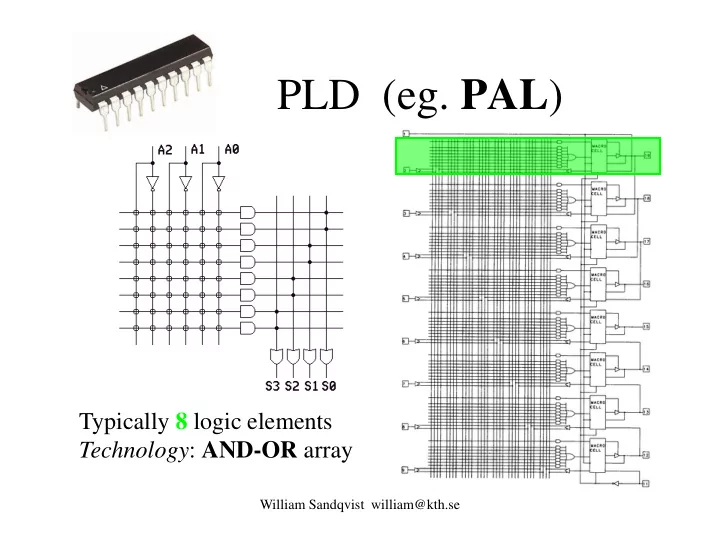
Typically 8 logic elements Technology: AND-OR array

slide-2
SLIDE 2

CPLD (eg. MAX)

Typically 64 Macrocells Technology : AND-OR array (larger MAX circuits uses MUX-tree technique)

William Sandqvist william@kth.se

slide-3
SLIDE 3

Gates with many inputs?

William Sandqvist william@kth.se

VA VB VC VQ VDD VSS

Everyone must lead to get "0" = slow when there are many inputs PAL matrix has gates has so many inputs that you have to draw them in a "simplified way" CMOS NAND

slide-4
SLIDE 4

As bad with CMOS NOR

William Sandqvist william@kth.se

Everyone must lead to get "1" = slow when there are many inputs (one of them must lead to get "0" = fast)

CMOS NOR

slide-5
SLIDE 5

Fast, but with high power dissipation

"Pull-Up" resistor provides "1" = Fast but "Power Hungry" when

  • utput is "0"

Just one must lead to get "0"? = Fast

NMOS NOR

William Sandqvist william@kth.se

Can be used for many inputs, but NMOS will use much more power than the CMOS!

slide-6
SLIDE 6

Large programmable circuits

William Sandqvist william@kth.se

There is therefore a need for other techniques not based on gates with many inputs, in order to be able to build large programmable circuits in CMOS technology!

slide-7
SLIDE 7

Typically 50000 logic elements

FPGA (eg. Cyclone II)

William Sandqvist william@kth.se

Technology : MUX tree

slide-8
SLIDE 8

The Multiplexor MUX

William Sandqvist william@kth.se

1 X Y S Z

Z = SX + S Y

The multiplexer can select which input you are going to connect to the output.

MUX is now the "standard component" in the development of Digital Logic.

slide-9
SLIDE 9

Multiplexer MUX

William Sandqvist william@kth.se

1 X Y S Z

Z = SX + S Y

To the right we have a MUX in rope technology - April 1-joke from Scientific American! Did you recognize that it was a MUX that was the "secret" circuit at LAB1?

slide-10
SLIDE 10

Logical functions with MUX

William Sandqvist william@kth.se

1 X Y S Z

Z = SX + S Y

How can the following functions be implemented with a 2: 1 Multiplexer?

XOR x x Z OR x x Z AND x x Z NOT x Z

1 1 1

⊕ = + = ⋅ = =

?

slide-11
SLIDE 11

Quickie Question …

William Sandqvist william@kth.se

How to connect the inputs of the MUX in

  • rder to implement an inverter?

Desired function:

slide-12
SLIDE 12

Invertering NOT with MUX

William Sandqvist william@kth.se

1 1 Z Input (x0) 1

x0 0 1

Specification:

if input = ’1’ then result <= ’0’ if input = ’0’ then result <= ’1’;

0 0

1 Z S X S Y x x x NOT = ⋅ + ⋅ = = ⋅ + ⋅ =

X Y S

slide-13
SLIDE 13

William Sandqvist william@kth.se

Quickie Question …

How to connect the inputs of the MUX in

  • rder to implement an and gate?

Desired function:

slide-14
SLIDE 14

AND-function with MUX

William Sandqvist william@kth.se

1 x0 Z x1 1

x0 x1 1 0 1

AND x x Z

1 ⋅

=

Specification:

1 1 1

x x x x x Y S SX Z ⋅ = ⋅ + ⋅ = + =

X Y S

slide-15
SLIDE 15

OR-function with MUX

William Sandqvist william@kth.se

1 x0 1 Z x1 1 1 1

x0 x1 1 0 1

OR x x Z

1 +

=

Specification:

1 1 1 1 1 1 1

{ } ( ) 1 Z x x x x x x SX SY x x x x x x x x = + + = = + = + + ⋅ = = ⋅ + ⋅

X Y S

slide-16
SLIDE 16

XOR-function with MUX

William Sandqvist william@kth.se

1 Z x1 1 1

x0 x1 1 0 1

XOR x x Z

1 ⊕

=

Specification:

1 1 1

x x x x x x Y S SX Z ⊕ = ⋅ + ⋅ = = + = x x

X Y S

slide-17
SLIDE 17

Hierarchies of muxes

William Sandqvist william@kth.se

1 x11 x10 Z s1 1 1 x01 x00 s0 11 10 01 00 Z x11 x10 x01 x00 s1s0

=

slide-18
SLIDE 18

Complex functions with MUXes

William Sandqvist william@kth.se

1 1 1 1 x y z 00 01 11 10 1

x y f

Choose any of the inputs as address inputs ... ... And minimize / implement function that occur? For each input. Draw new Karnaugh diagrams if necessary.

11 10 01 00 An (n + 1)-input function could be implemented with a MUX having n select-inputs!

zy y x x z f + + =

z z 1

slide-19
SLIDE 19

Shannon decomposition

William Sandqvist william@kth.se

Claude Shannon mathematician / electrical engineer (1916 –2001)

f xn x0 x1 f1 xn 1 x1 f0 xn x1 f x0

slide-20
SLIDE 20

Shannon decomposition

William Sandqvist william@kth.se

f xn x0 x1 f1 xn 1 x1 f0 xn x1 f x0 A Boolean function f(xn, …, x1, x0) can be divided to

) , , ... , ( ) 1 , , ... , ( ) , , ... , (

1 1 1

x x f x x x f x x x x f

n n n

⋅ + ⋅ =

The function can then be implemented with a multiplexer.

slide-21
SLIDE 21

Recursively

All Boolean functions f(xn, …, x1, x0) can be broken down (recursively) to

William Sandqvist william@kth.se

) , , ... , ( ) 1 , , ... , ( ) , , ... , (

1 1 1 1

x x f x x x f x x x x f

n n n

⋅ + ⋅ =

1 f11 f10 f x0 1 1 f01 f00 x1 1 f x0 f1 f0

) , , ... , ( ) 1 , , ... , ( ) , ... , (

2 10 1 2 11 1 1 1

x x f x x x f x x x f

n n n

⋅ + ⋅ =

and so on. f0000 … f1 f0

slide-22
SLIDE 22

Proof

William Sandqvist william@kth.se

Right hand side:

if x0=1 so is the right term zero. Then the f is equal to the left term. if x0=0 so is the left term zero. Then the f is equal to the right term.

Left hand side:

if x0=1 so is f equal to f(xn,...,x1,1) (= left term on right side) if x0=0 so is f equal to f(xn,...,x1,0) (= right term on right side)

LHS=RHS

) , , ... , ( ) 1 , , ... , ( ) , , ... , (

1 1 1

x x f x x x f x x x x f

n n n

⋅ + ⋅ =

slide-23
SLIDE 23

MUX networks

William Sandqvist william@kth.se 1

z

1 1

y

1 1 1 1

x

111 1 011 0 101 0 001 1 110 0 010 1 100 1 000 0 Address Address pins Value 1 1 1 1 yz x 00 01 11 10 1

One can see xyz as an address, to the squares in the

  • Karnaughmap. With values

1/0 from the squares to the inputs of the MUX the function f is realized.

f f

slide-24
SLIDE 24

Look-up-table (LUT)

William Sandqvist william@kth.se

0/1 0/1 0/1 0/1

x1 x2 f Two-input LUT

Programmable cells

1 1 1

A LUT with n inputs can realize all combinational functions with n inputs

slide-25
SLIDE 25

LUT for XOR-gate

William Sandqvist william@kth.se

1 1

x1 x2 f Two-input LUT

1 1 1

1 2

1 1 1 1 1 1 x x f

slide-26
SLIDE 26

A simple FPGA cell

William Sandqvist william@kth.se

LUT D Q CLK A B C D M RESET

S 1

The simplest FPGA cell consists of a single Look-Up- Table - LUT, a D flip-flop and a bypass mux. D flip-flop is a memory circuit for synchronization – it will come later in the course. With the bypass mux one can exclude the D flip-flop when not needed.

LUT A B C D f

D-flipflop will be explained soon in this course

slide-27
SLIDE 27

LUT function number

MSB LSB

6996 1 2 3

" 010110 0110100110 " ) , , , ( f x x x x f = =

William Sandqvist william@kth.se

Do you recognize the function ...? The functions that are stored in a LUT are usually numbered after the number that is made up of the 1's in the truth table / Karnaugh map.

Bit # 15 Bit # 0 Bit # 1

slide-28
SLIDE 28

LUT function number

6996 1 2 3

" 010110 0110100110 " ) , , , ( f x x x x f = =

William Sandqvist william@kth.se

1 2 3 6996

x x x x f ⊕ ⊕ ⊕ =

Now you know which function that has the number 6996! With a LUT, all functions are realized, so none of them are more difficult to make than any other! Odd parity! No mergings are possible.

slide-29
SLIDE 29

William Sandqvist william@kth.se

slide-30
SLIDE 30

Decoder

William Sandqvist william@kth.se

en a

1

a y y

1

y

2

y

3

1 1 1 1 1 1 1 1 1 1 1 1

  • a0

a1 en

y3 y2 y1 y0

2-to-4 decoder

Mostly used as address decoder Only one output is active when the 'enable' (en) is active The active output is selected with a1a0

slide-31
SLIDE 31

Demultiplexer

William Sandqvist william@kth.se

s1s0 y3 y2 y1 y0

The demultiplexer has basically the same function as the decoder, but is drawn differently ... The input is connected to a selected output

I0

f s

1

s y y

1

y

2

y

3

1 1 1 1 1 1 1 1 1 1 1 1

  • I0

Now en is namned I0!

slide-32
SLIDE 32

Read-only-memory (ROM)

William Sandqvist william@kth.se

0/1 0/1 ... 0/1 0/1 0/1 ... 0/1 . . . 0/1 0/1 ... 0/1

a0 a1 ... am

Sel0 Sel1 . . . Sel2m

En dn-1 dn-2 ... d0

Threestate buffers Decoder Programable bits

slide-33
SLIDE 33

Encoder

William Sandqvist william@kth.se

2

n

inputs w w

2

n 1

y y

n 1 –

n

  • utputs

Encoders have the opposite function as a decoder, ie it translates 2N bit input to a N-bitar code.

  • The information is concentrated
  • Eg. Keyboard with 16

(24) keys 4-bit HEX-code for the pressed key

16:4

slide-34
SLIDE 34

Priorityencoder

William Sandqvist william@kth.se

A Priority Encoder gives back the address of the input with the lowest (or highest) indices that are set to a one (or zero depending on what you are looking for). If all inputs are 0, the output f = 0, else f has the value = 1.

y0 y1 y2 y3 f a1 a0 1

  • 1

1

  • 1

1 1

  • 1

1 1 1 1 1

  • Now it will be well-

defined what happens if several inputs are active. What if you press several keys at the same time?

slide-35
SLIDE 35

William Sandqvist william@kth.se

slide-36
SLIDE 36

William Sandqvist william@kth.se

Ex 8.4 7-4-2-1 code

(a variant of the 7-4-2-1 code is used today to store the bar code) Codeconverter 7-4-2-1-code to BCD-code. When encoding the digits 0 ... 9 sometimes a code with weights 7-4-2-1 was used instead of the binary code with the weights 8-4-2-1. In cases where a digit of the code word could be selected in various ways, the code word containing the least number of ones is choosen.

You will construct such an encoder at exercice 3.

7421/BCD

slide-37
SLIDE 37

William Sandqvist william@kth.se

slide-38
SLIDE 38

Code-converter

William Sandqvist william@kth.se

Code-converters translates from one code to another. Typical examples are:

  • Binary to BCD (Binary-Coded Decimal)
  • Binary to Gray-code
  • BCD or BIN to 7-segment decoder
slide-39
SLIDE 39

Ex 8.5 One of the segments ”g”

William Sandqvist william@kth.se

7-segment decoder consists of 7 different combinatorial circuits,

  • ne for each segment.

One should look at Karnaughmaps for all segments

  • simultaneously. There

could be groupings that are common to several segments! The optimal 7-segmentdecoder has probably already been invented!

slide-40
SLIDE 40

William Sandqvist william@kth.se

slide-41
SLIDE 41

Graycode or Binarycode ?

William Sandqvist william@kth.se

Wind direction indicator usually use Gray code to provide safe decoding. Wind direction Wind speed

slide-42
SLIDE 42

Binary Code disadvantage

William Sandqvist william@kth.se

  • Safe Data Registration use Graycode
  • Data Processing Binarycode

Binary code, adjacent code words 1-2 double change 3-4 triple change 5-6 double change 7-8 quadruple change! 9-A double change B-C quadruple change! D-E double change F-0 quadruple change! But can two bits change at exactly the same time?

slide-43
SLIDE 43

William Sandqvist william@kth.se

Graycode

By changing the order of the code words, one can find codes where it is never more than one bit at a time that changes in the transitions from one codeword to the

  • next. Such codes are called Gray Codes.

0000, 0001, 0011, 0010, 0110, 0111, 0101, 0100 1100, 1101, 1111, 1110, 1010, 1011, 1001, 1000

slide-44
SLIDE 44

can number the corners of a Boolean space

William Sandqvist william@kth.se

N=4

1000 1010 1001 1101 1111 1011 1100 0000 0011 0001 0111 0101 0010 0110 0100 0110

With Gray codes one can number the "hyper-corners" in a Boolean space.

slide-45
SLIDE 45

can solve the “Towers of Hanoi”

William Sandqvist william@kth.se

Gray code is also very helpful for those who want to solve the game "Towers of Hanoi“, constructed by the mathematician Edouard Lucas in 1883.

According to legend, three monks move 64 golden discs, of different sizes, from one bar to another. The discs should be moved one by one, and they must always be placed so that a smaller disc ports on a larger disc. When the monks are done with their work the earth will go under - it will take 264 moves, so the whole thing will probably take a while ...

slide-46
SLIDE 46

William Sandqvist william@kth.se William Sandqvist william@kth.se

Conversion Binary-Gray

Binary → Gray: If Binary bit bn and bit bn-1 are different, the Graycode bit gn-1 ”1", else ”0". Gray → Binary ( the most common transformation direction ): If Binary bit bn and Graycode bit gn-1 are different the Binary bit bn-1 is ”1", else ”0".

slide-47
SLIDE 47

William Sandqvist william@kth.se

Logic Gate for the conversion

XOR-gate is ”1” if the inputs are different! 4 bit code converter Gray cote to Binary code

Gray/Bin

slide-48
SLIDE 48

William Sandqvist william@kth.se

slide-49
SLIDE 49

VHDL-introduction

VHDL is a language used to specify the hardware

  • HDL - Hardware Description Language
  • VHSIC - Very High Speed Integrated Circuit

Used mostly in Europe

  • Verilog is also a language used to specify the

hardware Used mostly in the United States

William Sandqvist william@kth.se

slide-50
SLIDE 50

Entity

William Sandqvist william@kth.se

Cin A B S Cout

FA

entity fulladder is port( A,B,Cin : IN std_logic; S,Cout : OUT std_logic); end fulladder;

The entity describes the ports to the outside of the circuit. The circuit as a block.

slide-51
SLIDE 51

Architecture

William Sandqvist william@kth.se

Cin A B S Cout

FA

architecture behave of fulladder is begin S <= A xor B xor Cin; Cout <= (A and B) or (A and Cin) or (B and Cin); end behave;

Architecture describes the function inside the circuit.

slide-52
SLIDE 52

Why VHDL?

William Sandqvist william@kth.se

VHDL is used to

  • be able to verify that you have the right functioning

by simulating the circuit

  • be able to describe large structures in a simple way

and then generate the circuit by synthesis

  • enable structured descriptions of a circuit

VHDL increases the level of abstraction!

slide-53
SLIDE 53

Basics in VHDL

William Sandqvist william@kth.se

There are two types of VHDL code

  • VHDL for synthesis: The code is to be input to a

synthesis tool which converts it into an implementation (for example, on an FPGA)

  • VHDL for modeling and simulation: The code is

used to describe a system in an early stage. Since the code can be simulated you can check on the intended operation is correct.

slide-54
SLIDE 54

VHDL Hierarchie

William Sandqvist william@kth.se

Generics Ports Entity Architecture Architecture Architecture (structural) Process Sequential Statements Concurrent Statements Package Concurrent Statements

slide-55
SLIDE 55

Entity

William Sandqvist william@kth.se

Input Output Behavioral Entity

  • The primary abstraction level in VHDL is called entity
  • In a behavioral description one defines the entity through their

responses to signals and inputs

  • A behavioral model is the same as a "black box“

The inside is not visible from the outside – The entity's behavior is defined by the black box functionality

slide-56
SLIDE 56

Entity

William Sandqvist william@kth.se

  • An entity describes a component's interface with

the outside world

  • The PORT-declaration indicates if it is an input or
  • utput.
  • An entity is a symbol of a component.

ENTITY xor_gate IS PORT( x, y: IN bit; q: OUT bit); END xor_gate;

q xor_gate Use English names for variable names in the code!

slide-57
SLIDE 57

VHDL Port

William Sandqvist william@kth.se

  • PORT declaration establishes the interface between the component

and the outside world.

  • A port declaration contains three things :

– The name of the port – The direction of the port – The port's datatype

  • Example :

ENTITY test IS PORT( name : direction data_type); END test;

slide-58
SLIDE 58

The most common data types

William Sandqvist william@kth.se

  • Scalars (signals/variables)

– bit (’0’,’1’) – std_logic (’U’,’0’,’1’,’X’,’Z’,’L’,’H’,’W’,’-’) – integer – real – time

  • Vectors (multivalued signals / variables)

– bit_vector – vector of bit’s – std_logic_vector – vector of std_logic

slide-59
SLIDE 59

Architecture

William Sandqvist william@kth.se

  • An architecture describes the function of the component.
  • An entity can have many architectures, but only one can be active at

a time.

  • An architecture corresponds to the component circuit diagram or

behavior.

X y q

ARCHITECTURE behavior OF xor_gate IS BEGIN q <= a xor b after 5 ns; END behavior;

Code for simulation <= means arrow

slide-60
SLIDE 60

VHDL-Examle: 4/1 multiplexer

William Sandqvist william@kth.se

LIBRARY ieee; USE ieee.std_logic_1164.ALL; ENTITY Multiplexer_41 IS PORT(ce_n : IN std_logic; -- Chip En(active low) data_in : IN std_logic_vector(3 DOWNTO 0); sel : IN std_logic_vector(1 DOWNTO 0); data_out : OUT std_logic); -- TriState Output END ENTITY Multiplexer_41; sel(1) sel(0) data_out 11 10 01 00 data_in(3) data_in(2) data_in(1) data_in(0) ce_n

slide-61
SLIDE 61

VHDL-Example: 4/1 multiplexer

William Sandqvist william@kth.se

ARCHITECTURE RTL OF Multiplexer_41 IS BEGIN PROCESS(ce_n, data_in, sel) BEGIN IF ce_n = '1' THEN data_out <= 'Z'; ELSE CASE sel IS WHEN "00"=> data_out <= data_in(0); WHEN "01"=> data_out <= data_in(1); WHEN "10"=> data_out <= data_in(2); WHEN "11"=> data_out <= data_in(3); WHEN OTHERS => null; END CASE; END IF; END PROCESS; END ARCHITECTURE RTL;

Threestate!

slide-62
SLIDE 62

Synthesis tool Quartus II

William Sandqvist william@kth.se

QuartusII Will be used in LAB 3

slide-63
SLIDE 63

More on VHDL

William Sandqvist william@kth.se

  • The study material on the synthesis shows a number

VHDL constructs and the resulting hardware

  • The following images contain additional materials

(optionally material)

  • The book gives many examples and detailed explanations
  • f VHDL
slide-64
SLIDE 64

Optionally material on VHDL

William Sandqvist william@kth.se

slide-65
SLIDE 65

signal declaration

William Sandqvist william@kth.se

Signal-declaration is used inside architectures to declare internal (local) signals : signal a,b,c,d : bit; signal a,b,sum : bit_vector(31 downto 0); Signal assignment is used to describing the behavior : sum <= a + b; -- assignment without delay

slide-66
SLIDE 66

VHDL description various styles

William Sandqvist william@kth.se

  • Data Flow

Concurrent assignments

  • Structural

similar to how to connect components

  • Sequential

similar to how to write computer programs

slide-67
SLIDE 67

Sequential or Parallel Code

William Sandqvist william@kth.se

  • There are two types of code execution in VHDL:

sequential and parallel

  • Hardware can then be modeled in two different

ways

  • VHDL is supporting two different levels of

abstraction.

  • Sequential code describes the hardware from a

programmer's point of view and are executed in the order it is written.

  • The parallel code is executed regardless of the
  • rder it is in and is asynchronous.
slide-68
SLIDE 68

Sequential style

William Sandqvist william@kth.se

XOR-gate x y q

process(x,y) begin if (x/=y) then q <= ‘1’; else q <= ‘0’; end if; end process;

means not!

slide-69
SLIDE 69

Data flow style

William Sandqvist william@kth.se

XOR-gate x y q q <= a xor b; Or as ”behavioural dataflow style” q <= ‘1’ when a/=b else ‘0’; not equal

slide-70
SLIDE 70

Structural style

William Sandqvist william@kth.se

x y q

u1: not_gate port map (x,xi); u2: not_gate port map (y,yi); u3: and_gate port map (xi,y,t3); u4: and_gate port map (yi,x,t4); u5: or_gate port map (t3,t4,q);

yi xi t3 t4

slide-71
SLIDE 71

Structural code

William Sandqvist william@kth.se

  • A component must be declared before it can be used
  • Required, unless it is is already in a library somewhere

ARCHITECTURE test OF test_entity COMPONENT and_gate PORT ( in1, in2 : IN BIT;

  • ut1 : OUT BIT);

END COMPONENT; ... more statements ...

in1 in2

  • ut1
slide-72
SLIDE 72

Instantiation

William Sandqvist william@kth.se

Component instantiation connects the component interface with the signals in the architecture.

ARCHITECTURE test OF test_entity COMPONENT and_gate PORT ( in1, in2 : IN BIT;

  • ut1 : OUT BIT);

END COMPONENT; SIGNAL S1, S2, S3 : BIT; BEGIN Gate1 : and_gate PORT MAP (S1,S2,S3); END test;

in1 in2

  • ut1

S1 S2 S3

slide-73
SLIDE 73

generate

William Sandqvist william@kth.se

ENTITY adder IS GENERIC(N:integer) PORT(a,b:IN bit_vector(N-1 downto 0); sum:OUT bit_vector(N-1 downto 0)); END adder; ARCHITECTURE structural OF adder IS COMPONENT full_adder PORT(a,b,cin:IN bit;cout,s:OUT bit); END COMPONENT; signal c:bit_vector(N-2 downto 0); BEGIN G0:for i in 1 to N-2 generate U0:full_adder PORT MAP (a(i),b(i),c(i-1),c(i),s(i)); end generate; -- G0 U0:full_adder PORT MAP (a(0),b(0),’0’,c(0),s(0)); UN:full_adder PORT MAP (a(N-1),b(N-1),c(N-2),OPEN,s(N-1); END structural;

  • Generate-statement connects many of the same elements

Generate an n- bit adder!

slide-74
SLIDE 74

generate n-bit adder

William Sandqvist william@kth.se

FA

a1 b1 cin1

FA

a0 b0 cin0 s0 s1

FA

an-1 bn-1 cinn-1 sn-1 cut0 cutn-1

Five lines of code generates the ripple-carry n-bit adder from F5!

slide-75
SLIDE 75

Test Benches

William Sandqvist william@kth.se

  • To test if your design works so you have to create a test
  • bench. It has three functions :

– Generating stimuli for simulation – Apply these stimuli to an entity to be tested – Comparing the output values ​​with expected values

You will use a test bench at LAB 3. A test bench program can try tirelessly through all input combinations!

slide-76
SLIDE 76

Testbench

William Sandqvist william@kth.se

ENTITY testbench IS END testbench; ARCHITECTURE xor_stimuli_1 of testbench IS COMPONENT xor_gate PORT(x,y:IN bit; q:OUT bit); END COMPONENT; signal x,y,u1,ut2,ut3:bit; BEGIN x <= not(x) after 10 ns; y <= not(y) after 20 ns; U1:xor_gate PORT MAP (x,y,ut1); U2:xor_gate PORT MAP (x,y,ut2); U3:xor_gate PORT MAP (x,y,ut3); END example;

The ENTITY is empty! Here are the test signals generated The circuit under test is used as a component of the test bench program

slide-77
SLIDE 77

Testbench

William Sandqvist william@kth.se

A test bench can mark when the desired events

  • ccur during the execution.

Or mark when unwanted events occur The result of a run with a test bench can be saved in a file, as proof that everything is ok - or as a troubleshooting aid if it did not go well.

slide-78
SLIDE 78

William Sandqvist william@kth.se