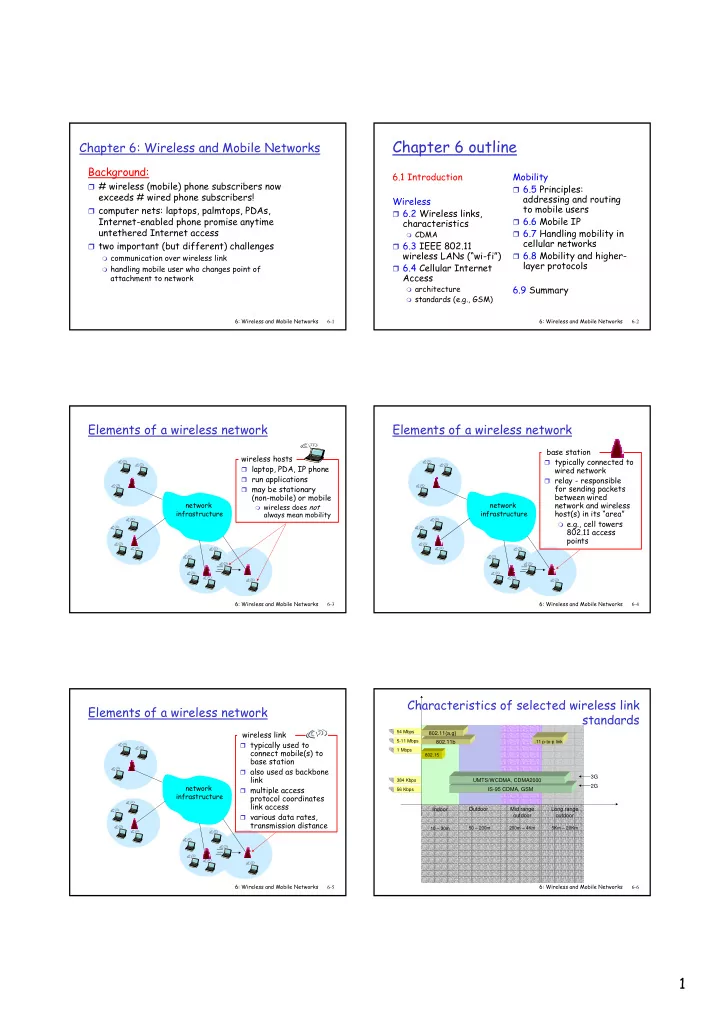
Chapter 6 outline Chapter 6: Wireless and Mobile Networks - - PDF document

chapter 6 outline
SMART_READER_LITE
LIVE PREVIEW

Chapter 6 outline Chapter 6: Wireless and Mobile Networks - - PDF document

Chapter 6 outline Chapter 6: Wireless and Mobile Networks Background: 6.1 Introduction Mobility # wireless (mobile) phone subscribers now 6.5 Principles: exceeds # wired phone subscribers! addressing and routing Wireless to mobile


slide-1
SLIDE 1

1

6: Wireless and Mobile Networks 6-1

Chapter 6: Wireless and Mobile Networks

Background:

# wireless (mobile) phone subscribers now

exceeds # wired phone subscribers!

computer nets: laptops, palmtops, PDAs,

Internet-enabled phone promise anytime untethered Internet access

two important (but different) challenges

communication over wireless link handling mobile user who changes point of

attachment to network

6: Wireless and Mobile Networks 6-2

Chapter 6 outline

6.1 Introduction Wireless

6.2 Wireless links,

characteristics

CDMA

6.3 IEEE 802.11

wireless LANs (“wi-fi”)

6.4 Cellular Internet

Access

architecture standards (e.g., GSM)

Mobility

6.5 Principles:

addressing and routing to mobile users

6.6 Mobile IP 6.7 Handling mobility in

cellular networks

6.8 Mobility and higher-

layer protocols 6.9 Summary

6: Wireless and Mobile Networks 6-3

Elements of a wireless network

network infrastructure

wireless hosts

laptop, PDA, IP phone run applications may be stationary

(non-mobile) or mobile

wireless does not

always mean mobility

6: Wireless and Mobile Networks 6-4

Elements of a wireless network

network infrastructure

base station

typically connected to

wired network

relay - responsible

for sending packets between wired network and wireless host(s) in its “area”

e.g., cell towers

802.11 access points

6: Wireless and Mobile Networks 6-5

Elements of a wireless network

network infrastructure

wireless link

typically used to

connect mobile(s) to base station

also used as backbone

link

multiple access

protocol coordinates link access

various data rates,

transmission distance

6: Wireless and Mobile Networks 6-6

Characteristics of selected wireless link standards

384 Kbps 56 Kbps 54 Mbps 5-11 Mbps 1 Mbps 802.15

802.11b 802.11{a,g} IS-95 CDMA, GSM UMTS/WCDMA, CDMA2000

.11 p-to-p link

2G 3G Indoor

10 – 30m

Outdoor

50 – 200m

Mid range

  • utdoor

200m – 4Km

Long range

  • utdoor

5Km – 20Km

slide-2
SLIDE 2

2

6: Wireless and Mobile Networks 6-7

Elements of a wireless network

network infrastructure

infrastructure mode

base station connects

mobiles into wired network

handoff: mobile

changes base station providing connection into wired network

6: Wireless and Mobile Networks 6-8

Elements of a wireless network

Ad hoc mode

no base stations nodes can only

transmit to other nodes within link coverage

nodes organize

themselves into a network: route among themselves

6: Wireless and Mobile Networks 6-9

Wireless Link Characteristics

Differences from wired link ….

decreased signal strength: radio signal

attenuates as it propagates through matter (path loss)

interference from other sources: standardized

wireless network frequencies (e.g., 2.4 GHz) shared by other devices (e.g., phone); devices (motors) interfere as well

multipath propagation: radio signal reflects off

  • bjects ground, arriving ad destination at

slightly different times …. make communication across (even a point to point) wireless link much more “difficult”

6: Wireless and Mobile Networks 6-10

Wireless network characteristics

Multiple wireless senders and receivers create additional problems (beyond multiple access):

A B C

Hidden terminal problem

B, A hear each other B, C hear each other A, C can not hear each other

means A, C unaware of their interference at B

A B C

A’s signal strength

space

C’s signal strength

Signal fading:

B, A hear each other B, C hear each other A, C can not hear each other

interferring at B

6: Wireless and Mobile Networks 6-11

Chapter 6 outline

6.1 Introduction Wireless

6.2 Wireless links,

characteristics

CDMA

6.3 IEEE 802.11

wireless LANs (“wi-fi”)

6.4 Cellular Internet

Access

architecture standards (e.g., GSM)

Mobility

6.5 Principles:

addressing and routing to mobile users

6.6 Mobile IP 6.7 Handling mobility in

cellular networks

6.8 Mobility and higher-

layer protocols 6.9 Summary

6: Wireless and Mobile Networks 6-12

IEEE 802.11 Wireless LAN

802.11b

2.4-5 GHz unlicensed

radio spectrum

up to 11 Mbps direct sequence spread

spectrum (DSSS) in physical layer

  • all hosts use same

chipping code

widely deployed, using

base stations 802.11a

5-6 GHz range up to 54 Mbps

802.11g

2.4-5 GHz range up to 54 Mbps

All use CSMA/CA for

multiple access

All have base-station

and ad-hoc network versions

slide-3
SLIDE 3

3

6: Wireless and Mobile Networks 6-13

802.11 LAN architecture

wireless host communicates

with base station

base station = access

point (AP)

Basic Service Set (BSS)

(aka “cell”) in infrastructure mode contains:

wireless hosts access point (AP): base

station

ad hoc mode: hosts only

BSS 1 BSS 2 Internet hub, switch

  • r router

AP AP

6: Wireless and Mobile Networks 6-14

IEEE 802.11: multiple access

avoid collisions: 2+ nodes transmitting at same time 802.11: CSMA - sense before transmitting

don’t collide with ongoing transmission by other node

802.11: no collision detection!

difficult to receive (sense collisions) when transmitting due

to weak received signals (fading)

can’t sense all collisions in any case: hidden terminal, fading goal: avoid collisions: CSMA/C(ollision)A(voidance)

A B C A B C

A’s signal strength

space

C’s signal strength 6: Wireless and Mobile Networks 6-15

IEEE 802.11 MAC Protocol: CSMA/CA

802.11 sender 1 if sense channel idle for DIFS then

transmit entire frame (no CD) 2 if sense channel busy then start random backoff time timer counts down while channel idle transmit when timer expires if no ACK, increase random backoff interval, repeat 2

802.11 receiver

  • if frame received OK

return ACK after SIFS (ACK needed due to hidden terminal problem)

sender receiver

DIFS

data

SIFS

ACK

6: Wireless and Mobile Networks 6-16

Avoiding collisions (more)

idea: allow sender to “reserve” channel rather than random

access of data frames: avoid collisions of long data frames

sender first transmits small request-to-send (RTS) packets

to BS using CSMA

RTSs may still collide with each other (but they’re short)

BS broadcasts clear-to-send CTS in response to RTS RTS heard by all nodes

sender transmits data frame

  • ther stations defer transmissions

Avoid data frame collisions completely using small reservation packets!

6: Wireless and Mobile Networks 6-17

Collision Avoidance: RTS-CTS exchange

AP A B time RTS(A) RTS(B) RTS(A) C T S ( A ) CTS(A) DATA (A) A C K ( A ) ACK(A) reservation collision defer

6: Wireless and Mobile Networks 6-18

M radius of coverage S S S P P P P M S

Master device Slave device Parked device (inactive)

P

802.15: personal area network

less than 10 m diameter replacement for cables

(mouse, keyboard, headphones)

ad hoc: no infrastructure master/slaves:

slaves request permission to

send (to master)

master grants requests

802.15: evolved from

Bluetooth specification

2.4-2.5 GHz radio band up to 721 kbps

slide-4
SLIDE 4

4

6: Wireless and Mobile Networks 6-19

Chapter 6 outline

6.1 Introduction Wireless

6.2 Wireless links,

characteristics

CDMA

6.3 IEEE 802.11

wireless LANs (“wi-fi”)

6.4 Cellular Internet

Access

architecture standards (e.g., GSM)

Mobility

6.5 Principles:

addressing and routing to mobile users

6.6 Mobile IP 6.7 Handling mobility in

cellular networks

6.8 Mobility and higher-

layer protocols 6.9 Summary

6: Wireless and Mobile Networks 6-20 Mobile Switching Center

Public telephone network, and Internet

Mobile Switching Center

Components of cellular network architecture

connects cells to wide area net manages call setup (more later!) handles mobility (more later!)

MSC

covers geographical

region

base station (BS)

analogous to 802.11 AP

mobile users attach

to network through BS

air-interface:

physical and link layer protocol between mobile and BS

cell wired network

6: Wireless and Mobile Networks 6-21

Cellular networks: the first hop

Two techniques for sharing mobile-to-BS radio spectrum

combined FDMA/TDMA:

divide spectrum in frequency channels, divide each channel into time slots

CDMA: code division

multiple access

frequency bands time slots

6: Wireless and Mobile Networks 6-22

Cellular standards: brief survey

2G systems: voice channels

IS-136 TDMA: combined FDMA/TDMA (north

america)

GSM (global system for mobile communications):

combined FDMA/TDMA

most widely deployed

IS-95 CDMA: code division multiple access

IS-136 GSM IS-95 G P R S E D G E CDMA-2000 UMTS T D M A / F D M A Don’t drown in a bowl

  • f alphabet soup: use this
  • or reference only

6: Wireless and Mobile Networks 6-23

Cellular standards: brief survey

2.5 G systems: voice and data channels

for those who can’t wait for 3G service: 2G extensions general packet radio service (GPRS)

evolved from GSM data sent on multiple channels (if available)

enhanced data rates for global evolution (EDGE)

also evolved from GSM, using enhanced modulation Date rates up to 384K

CDMA-2000 (phase 1)

data rates up to 144K evolved from IS-95 6: Wireless and Mobile Networks 6-24

Cellular standards: brief survey

3G systems: voice/data

Universal Mobile Telecommunications Service (UMTS)

GSM next step, but using CDMA

CDMA-2000

….. more (and more interesting) cellular topics due to mobility (stay tuned for details)

slide-5
SLIDE 5

5

6: Wireless and Mobile Networks 6-25

Chapter 6 outline

6.1 Introduction Wireless

6.2 Wireless links,

characteristics

CDMA

6.3 IEEE 802.11

wireless LANs (“wi-fi”)

6.4 Cellular Internet

Access

architecture standards (e.g., GSM)

Mobility

6.5 Principles:

addressing and routing to mobile users

6.6 Mobile IP 6.7 Handling mobility in

cellular networks

6.8 Mobility and higher-

layer protocols 6.9 Summary

6: Wireless and Mobile Networks 6-26

What is mobility?

spectrum of mobility, from the network perspective:

no mobility high mobility

mobile wireless user, using same access point mobile user, passing through multiple access point while maintaining ongoing connections (like cell

phone)

mobile user, connecting/ disconnecting from network using DHCP.

6: Wireless and Mobile Networks 6-27

Mobility: Vocabulary

home network: permanent “home” of mobile

(e.g., 128.119.40/24)

Permanent address: address in home network, can always be used to reach mobile

e.g., 128.119.40.186

home agent: entity that will perform mobility functions on behalf of mobile, when mobile is remote

wide area network

correspondent 6: Wireless and Mobile Networks 6-28

How do you contact a mobile friend:

search all phone

books?

call her parents? expect her to let you

know where he/she is? I wonder where Alice moved to? Consider friend frequently changing addresses, how do you find her?

6: Wireless and Mobile Networks 6-29

Mobility: approaches

Let routing handle it: routers advertise permanent

address of mobile-nodes-in-residence via usual routing table exchange.

routing tables indicate where each mobile located no changes to end-systems

Let end-systems handle it:

indirect routing: communication from

correspondent to mobile goes through home agent, then forwarded to remote

direct routing: correspondent gets foreign

address of mobile, sends directly to mobile

6: Wireless and Mobile Networks 6-30

Mobility: approaches

Let routing handle it: routers advertise permanent

address of mobile-nodes-in-residence via usual routing table exchange.

routing tables indicate where each mobile located no changes to end-systems

let end-systems handle it:

indirect routing: communication from

correspondent to mobile goes through home agent, then forwarded to remote

direct routing: correspondent gets foreign

address of mobile, sends directly to mobile

not scalable to millions of mobiles

slide-6
SLIDE 6

6

6: Wireless and Mobile Networks 6-31

Mobility: registration

End result:

Foreign agent knows about mobile Home agent knows location of mobile

wide area network

home network visited network

1

mobile contacts foreign agent on entering visited network

2

foreign agent contacts home agent home: “this mobile is resident in my network”

6: Wireless and Mobile Networks 6-32

Chapter 6 outline

6.1 Introduction Wireless

6.2 Wireless links,

characteristics

CDMA

6.3 IEEE 802.11

wireless LANs (“wi-fi”)

6.4 Cellular Internet

Access

architecture standards (e.g., GSM)

Mobility

6.5 Principles:

addressing and routing to mobile users

6.6 Mobile IP 6.7 Handling mobility in

cellular networks

6.8 Mobility and higher-

layer protocols 6.9 Summary

6: Wireless and Mobile Networks 6-33 Public switched telephone network mobile user home Mobile Switching Center

HLR

home network visited network correspondent Mobile Switching Center

VLR

GSM: indirect routing to mobile

1 call routed to home network 2

home MSC consults HLR, gets roaming number of mobile in visited network

3 home MSC sets up 2nd leg of call to MSC in visited network 4 MSC in visited network completes call through base station to mobile

6: Wireless and Mobile Networks 6-34

Chapter 6 Summary

Wireless

wireless links:

capacity, distance channel impairments CDMA

IEEE 802.11 (“wi-fi”)

CSMA/CA reflects

wireless channel characteristics cellular access

architecture standards (e.g., GSM,

CDMA-2000, UMTS)

Mobility

principles: addressing,

routing to mobile users

home, visited networks direct, indirect routing care-of-addresses

case studies

mobile IP mobility in GSM

impact on higher-layer

protocols