Virtual Memory Evolution Initially, each program ran alone on the - - PowerPoint PPT Presentation

virtual memory evolution
SMART_READER_LITE
LIVE PREVIEW

Virtual Memory Evolution Initially, each program ran alone on the - - PowerPoint PPT Presentation

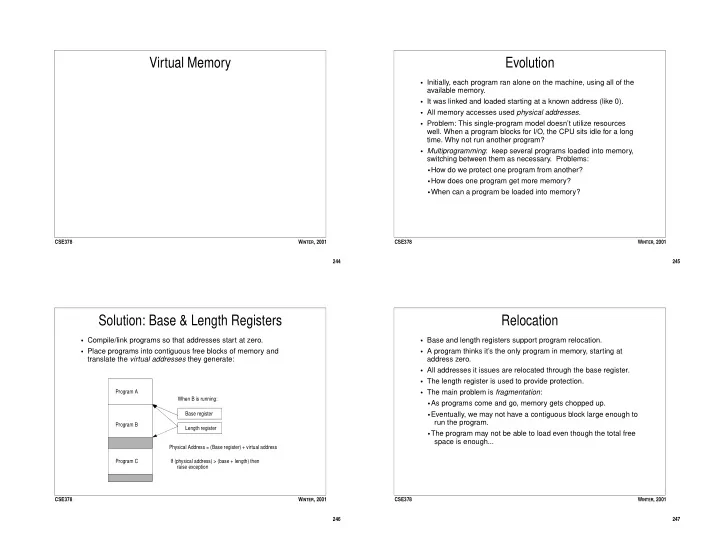
Virtual Memory Evolution Initially, each program ran alone on the machine, using all of the available memory. It was linked and loaded starting at a known address (like 0). All memory accesses used physical addresses . Problem:


slide-1
SLIDE 1

244 CSE378 WINTER, 2001

Virtual Memory

245 CSE378 WINTER, 2001

Evolution

  • Initially, each program ran alone on the machine, using all of the

available memory.

  • It was linked and loaded starting at a known address (like 0).
  • All memory accesses used physical addresses.
  • Problem: This single-program model doesn’t utilize resources
  • well. When a program blocks for I/O, the CPU sits idle for a long
  • time. Why not run another program?
  • Multiprogramming: keep several programs loaded into memory,

switching between them as necessary. Problems:

  • How do we protect one program from another?
  • How does one program get more memory?
  • When can a program be loaded into memory?

246 CSE378 WINTER, 2001

Solution: Base & Length Registers

  • Compile/link programs so that addresses start at zero.
  • Place programs into contiguous free blocks of memory and

translate the virtual addresses they generate:

Program A Program B Program C Base register Length register When B is running: Physical Address = (Base register) + virtual address If (physical address) > (base + length) then raise exception 247 CSE378 WINTER, 2001

Relocation

  • Base and length registers support program relocation.
  • A program thinks it’s the only program in memory, starting at

address zero.

  • All addresses it issues are relocated through the base register.
  • The length register is used to provide protection.
  • The main problem is fragmentation:
  • As programs come and go, memory gets chopped up.
  • Eventually, we may not have a contiguous block large enough to

run the program.

  • The program may not be able to load even though the total free

space is enough...

slide-2
SLIDE 2

248 CSE378 WINTER, 2001

Virtual memory: Paging

  • Basic idea of paging is to divide the virtual address space into

equal sized chunks: pages.

  • Divide physical memory into equal sized chunks called page

frames.

  • Provide relocation information for every page of a program, so

that any virtual page can be stored in any physical page frame.

  • Thinking in terms of memory hierarchy, physical memory acts like

a fully associative cache between the processor and the disk, pages are blocks (lines).

  • Because disk transfers are expensive:
  • pages are large, to amortize the cost of transfer
  • a write-back policy is used, so changes are only written to disk

when a page is replaced

249 CSE378 WINTER, 2001

Paging in Pictures

  • Note: N can be larger than M; programs A and B share frame 3;

virtual page 2 (Program A) is not mapped.

virtual page 0 virtual page 1 virtual page 2 ... ... virtual page N virtual page 0 virtual page 1 virtual page 2 page frame 0 page frame 1 page frame 2 page frame 3 ... ... ... ... ... ... ... page frame M Program A Virtual Address Space Program B Virtual Address Space Physical Memory

250 CSE378 WINTER, 2001

Page Tables

  • Paging allows a virtual address space larger than the physical

address space.

  • Each program has a data structure called a page table, that

provides relocation information for each of that program’s pages.

  • Each page table entry (PTE) indicates:
  • where the virtual page is stored (which physical frame)
  • valid bit: is the page in memory? If the valid bit is zero, an

attempt to access the page results in a page fault.

  • dirty bit: has the page been modified?
  • protection bits: used to control read/write/execute access
  • reference bits: used to implement/approximate LRU replacement
  • A program can run without having all of it’s pages in memory:

some pages can reside on the disk.

251 CSE378 WINTER, 2001

Page Tables in Pictures

virtual page 0 virtual page 1 virtual page 2 ... ... virtual page N virtual page 0 virtual page 1 virtual page 2 page frame 0 page frame 1 page frame 2 page frame 3 ... ... ... ... ... ... ... page frame M Program A V.A. Space Program B Physical Memory 1 1 1 1 1 1 B’s page table A’s page table valid bits frame number

slide-3
SLIDE 3

252 CSE378 WINTER, 2001

Translating a Virtual Address

  • Page size is always a power of 2: we can view an address as

consisting of a virtual page number, and an offset.

  • Example, page size = 4KB, or 2^12 bytes

Virtual page number offset 31 12 11 0 Virtual Address: 1

  • Phys. frame number offset

31 12 11 0 Page Table The page table maps virtual page numbers to physical frame numbers.

253 CSE378 WINTER, 2001

Processes

  • A process (a program in execution) is defined by:
  • Registers: PC, a stack pointer, general registers
  • Page tables: which point to the data (program text, stack, etc)
  • bookeeping info: open files, limits, time used, process ID, etc.
  • On a uniprocessor, only one process runs at a time. Switching

from one process to another is called a context switch.

  • Performing a switch from A to B requires interrupting A, saving the

A’s state (registers, PC), loading B’s state, and jumping to the new PC.

  • In a simple model, processes are in one of three states:
  • Running - in control of the CPU
  • Ready - waiting for the CPU
  • Waiting - waiting for some event (such as I/O completion)
  • CSE451

254 CSE378 WINTER, 2001

Protection and Sharing

  • Address translation can be used to protect processes from each
  • ther and to allow processes to share date.
  • Different processes have their own page tables which generally

point to different locations in memory, providing protection -- a program cannot generate a physical address that belongs to another process.

  • If two PTEs from different processes point to the same physical

location in memory, then those processes share that page.

  • Also read/write bits associated with PTEs can implement finer-

grained access.

  • To make this work, programs must be prohibited from modifying

their own page tables!

255 CSE378 WINTER, 2001

Speeding Translation: TLBs

  • To translate a virtual address into a physical address, we have to

do a lookup in the page table.

  • Translation costs (at least) one additional memory access.
  • Solution: build special hardware (Translation Lookaside Buffer) to

“cache” PTEs.

Virtual page number offset 31 12 11 0 Virtual Address: Tag (VPN) Data (PFN) D V Prot

MIPS TLBs are fully associative and small (64 entries)

slide-4
SLIDE 4

256 CSE378 WINTER, 2001

Memory Access in Pictures

Virtual Address TLB Lookup hit miss Access Cache hit Read data from cache (slightly Look up PTE. valid Reload TLB invalid Handle page

  • fault. Restart

instruction. different on write) miss Fetch data from main memory. (slightly different

  • n write)

257 CSE378 WINTER, 2001

Memory Access

  • On each reference, hardware searches TLB for translation info.
  • On a TLB hit, the physical address is passed to the cache.
  • On a TLB miss, either the hardware or software searches page

table (in MIPS this is in software).

  • If we a valid PTE, it reloads the TLB and continues translation.
  • If we find an invalid PTE, this means a page fault has occurred

(see below for how to deal with this).

  • TLB miss resolution is fast (10-30 cycles), and is often

accomplished in software (e.g. MIPS).

  • Handling a page fault takes much longer (because disk access is

needed), so the process is usually switched out.

258 CSE378 WINTER, 2001

TLB Organization

  • TLBs are small caches holding PTEs
  • MIPS organization: fully associative, write-allocate, write-back,

random replacement. MIPS TLB holds 64 entries.

  • What happens on a context switch? The PTEs in the TLB are no

longer valid for the new process. Two options:

  • Flush the TLB on each context switch (can be expensive if there

is a lot of switching)

  • Append a process ID (PID) to the virtual address. This way, the

TLB can hold mappings for more than one process.

259 CSE378 WINTER, 2001

Page Faults

  • Pages either live in memory (at the frame given by the PTE in the

page table) or on disk.

  • The OS maintains this information in the page table and other per-

process data structures.

  • When a program attempts to access a location that is not in

memory (PTE valid bit unset), we have a page fault.

  • Resolving the fault takes 100,000s of cycles (disk IO), so the

process which faulted must be interrupted and another process switched in: context switch.

  • In order to restart the program later on, the process state must be

saved, including all registers (and the PC) and the page tables.

slide-5
SLIDE 5

260 CSE378 WINTER, 2001

Handling a Page Fault

  • The page fault handler (part of the OS) will:
  • Find or free a physical frame.
  • There may be free frames in a “free list;” if so, grab one.
  • If there are no free frames, choose one to be replaced. If the

frame is dirty, initiate a write back to disk, and invalidate the associated PTE.

  • Find out where the faulting page resides on disk.
  • Initiate a read from disk to the selected frame (in memory).
  • Now switch in a new process, because the disk transfers will take

a while.

  • When the disk transfers complete, modify the PTE to make it

valid, and restart the faulting program.

261 CSE378 WINTER, 2001

Virtual memory summary

  • VM is just another level of the memory hierarchy.
  • pages = blocks; page faults = cache misses.
  • Misses are very expensive. Keep miss rate low with:
  • Large blocks
  • Fully associative mapping (need page tables)
  • Careful replacement (see CSE451)
  • Writes are expensive. Use write-back scheme.
  • VM provides an address space for each process. Provides

protection, and the illusion of very large address spaces (larger than physical memory). Can also be used to implement sharing between processes.

  • Translating each memory reference through the page table is

expensive, so we use a TLB, which is a cache of PTEs.

262 CSE378 WINTER, 2001

Memory hierarchy summary:

Feature Caches Paged Memory TLB Total size in bytes 4KB - 4MB 8MB - 1GB 100s - 1KB Block size in bytes 4-256 4KB - 16KB 4-16 Miss penalty (cycles) 10-100 100,000 - 1,000,000 10-50 Miss rates 1-10% 0.00001% - 0.0001% 0.01% - 1% Mapping direct-mapped or set associative fully associative fully associative

  • r set associative

Write policy WT/WB WB WB Who handles miss? Hardware OS (page fault) context switch OS or HW no context switch

263 CSE378 WINTER, 2001

Concepts

  • Address translation: this adds a level of indirection, giving the OS

control over laying out programs in memory.

  • Address translation is used to implement VM, sharing, protection
  • Process: a process is definied by a page table, a set of registers

(including the PC), and some pages (which hold program text, the stack, dynamic data, etc).

  • Caches: we’ve seen three important applications: TLB, caches,

virtual memory

  • Caches work because programs exhibit spatial and temporal

locality.

  • Block size, associativity, cache size, write policy, replacement

policy, and the speed of the next level of hierarchy impact the performance of a cache by effecting miss rate, miss penalty, access time of our cache